How to Use Alipay in China as a Foreigner: The Complete 2026 Guide12
Last updated: July 22, 2026 | Verified against Alipay Ant Group policies and People’s Bank of China directives
Introduction: Why This Guide Matters
China is the most cashless country on Earth. Street vendors, taxi drivers, high-speed rail stations, and even temple donation boxes accept QR code payments. If you don’t have Alipay (or WeChat Pay) set up, you’re not just inconvenienced — you’re functionally excluded from daily commerce.
The good news: since 2023, and especially after March 2024 policy changes, Alipay fully supports international visitors. You don’t need a Chinese bank account. You don’t need a Chinese phone number. You can link your Visa, Mastercard, JCB, Discover, or Diners Club card directly and pay like a local.
But here’s what most guides get wrong: Alipay Tour Pass is dead. If you’re reading a blog from 2022 or 2023 telling you to preload a temporary wallet, that advice is outdated and will waste your time.
This guide covers the current, correct method — direct card binding — with screenshots, troubleshooting, and real-world scenarios. Set it up before you fly. It takes 5 minutes and saves hours of confusion.
What Changed in 2024–2026
| Old Way (2019–2023) | New Way (2024–2026) |
| Alipay Tour Pass — prepaid wallet | Direct card binding — pay as you go |
| ¥2,000 (~$280) deposit required | No deposit |
| $200 balance cap | $5,000 per transaction / $50,000 per year |
| 90-day expiry | No expiry |
| Separate “Tour Pass” product | Integrated into main Alipay app |
| ~80% merchant acceptance | 90%+ merchant acceptance |
The March 2024 directive from the People’s Bank of China raised foreign card limits dramatically and eliminated the need for prepaid wallets. This is a genuine improvement — not a marketing spin.
Step 1: Download the App (Before You Fly)
iOS: Search “Alipay” on the App Store.
Android: Find it on Google Play or Huawei AppGallery.
Crucial: Install and set up the app before you enter China. Airport Wi-Fi can be unreliable, and you’ll need Alipay immediately upon landing for taxis, metro, or food
Language note: If you install Alipay outside China, it automatically switches to the international version with English as the default language. If it opens in Chinese, go to Me → Settings → General → Multiple Languages and select English.
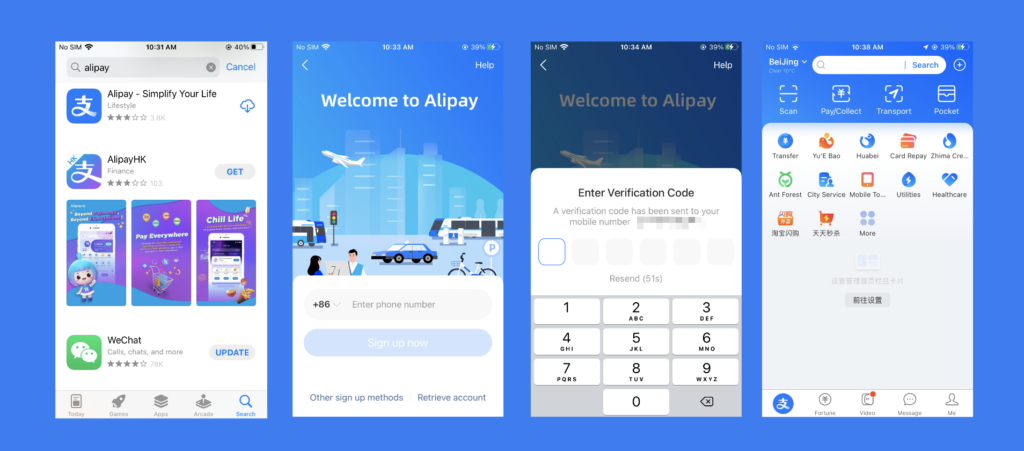
Step 2: Register Your Account
- Open the app and tap “Sign Up”
- Enter your home country phone number (US, UK, EU, Australian numbers all work)
- Receive the SMS verification code
- Set a secure login password
No Chinese phone number needed. Your regular home number works for registration, verification codes, and account recovery
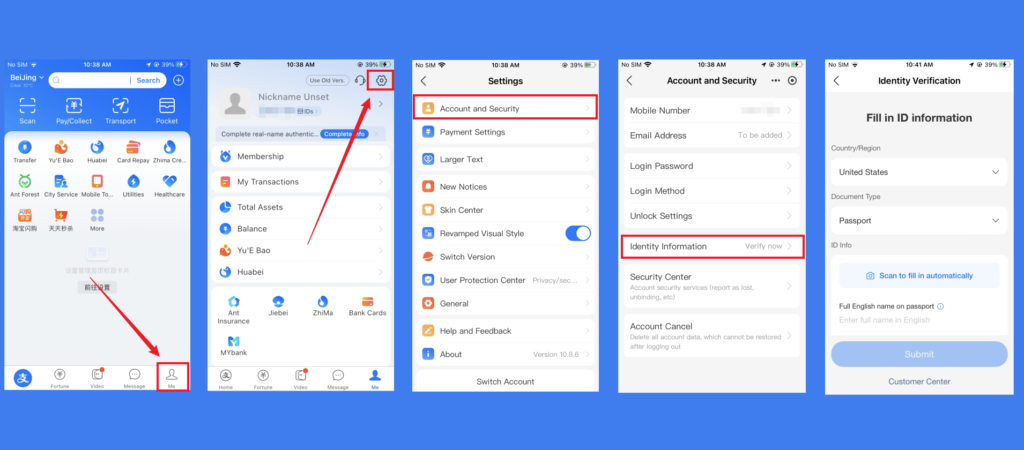
Step 3: Verify Your Identity (Passport)
This step is mandatory for meaningful spending limits. Without verification, you’ll hit walls fast.
Path: Me → Settings → Account & Security → Identity Verification
- Select “Passport” as your ID type
- Upload a clear photo of your passport data page
- Complete facial recognition (the app will prompt you to blink or turn your head)
- Wait for approval — usually instant, occasionally up to 24 hours
What verification unlocks: – Single transaction limit: $5,000 USD – Annual limit: $50,000 USD – Access to all merchant types (unverified accounts are heavily restricted)
Without verification: You can spend up to $2,000 USD per year, but transactions over $500 USD require ID verification anyway. Just do it upfront.
Step 4: Link Your Foreign Credit/Debit Card
This is where the old guides send you to “Tour Pass” or “Tour Card.” Ignore them. Here’s the correct 2026 method:
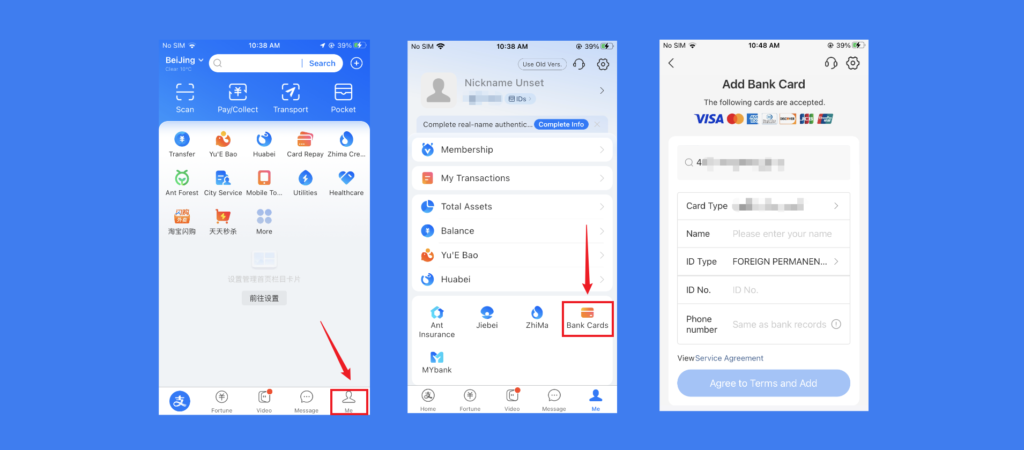
Path: Me → Bank Cards → Add Card
- Tap “+ Add Card”
- Set your 6-digit payment password (you’ll need this for every transaction — memorize it)
- Scan your card with the camera or enter details manually
- Supported networks: Visa, Mastercard, JCB, Discover, Diners Club
- Complete your bank’s authentication (usually an SMS OTP or 3D Secure)
American Express note: Amex acceptance is inconsistent. If your Amex fails, try a Visa or Mastercard backup.
Prepaid debit cards: These sometimes fail Know Your Customer (KYC) checks. Use a regular credit or debit card issued by a major bank for best results.
Step 5: How to Pay
Alipay offers two payment modes. Both work with your linked foreign card.
Method A: Scan Merchant QR Code (You Scan Them)
- Tap the “Scan” button on the home screen
- Point your camera at the merchant’s QR code
- Enter the amount in RMB (¥)
- Confirm with your 6-digit payment password
- Show the “Payment Successful” screen to the merchant
Where this works: Restaurants, shops, street vendors, market stalls — anywhere displaying a QR code.
Method B: Show Your QR Code (They Scan You)
- Tap the “Pay” button on the home screen
- Your personal payment QR code appears
- The merchant scans it with their device
- Amount is deducted automatically — no password needed for small amounts
Where this works: Supermarkets, chain stores, high-speed rail gates, metro turnstiles, DiDi rides.
Fees: What You’ll Actually Pay
| Transaction Amount | Alipay Fee | Your Bank Fee | Total Cost |
| ¥200 or less (~$28) | 0% | 0–3% (FX fee) | 0–3% |
| Over ¥200 | 3% on full amount | 0–3% (FX fee) | 3–6% |
Key insight: The 3% Alipay surcharge only applies to transactions above ¥200. For small purchases — coffee, metro rides, street food — there is no Alipay fee at all. Your only cost is your card issuer’s foreign transaction fee.
How to minimize fees: – Use a no-foreign-transaction-fee card (Chase Sapphire, Revolut, Capital One Venture, etc.) – For large purchases over ¥200, consider using a physical card at international hotels or upscale restaurants if they accept it – The 3% fee is still cheaper than currency exchange booths at airports (typically 5–8% spread)
What Alipay Can Do Beyond Payments
Alipay is not just a wallet — it’s a digital Swiss Army knife for China. Here are the features most useful to foreign travelers:
1. DiDi Ride-Hailing (Built-In)
No need to download a separate DiDi app. Search “DiDi” in Alipay’s search bar or find the icon on the home screen. Enter pickup and destination in English, select your ride type, and pay automatically. After the ride, a digital receipt appears in your account.
2. Public Transport (50+ Cities)
Search “出行” (Transport) on the home screen. Select your city, activate the transport card, link your international card, and scan the QR code at metro gates or bus scanners. Works in Beijing, Shanghai, Guangzhou, Hangzhou, Chengdu, and dozens more.
3. Train Tickets (12306 Integration)
Alipay connects to China’s official rail booking system. Search for train routes, select seats, and pay — all within the app. You’ll receive a digital ticket; no paper needed at most stations.
4. Hotel & Attraction Bookings
Many hotels and tourist attractions accept Alipay bookings. The app often offers discounts not available on Western platforms.
5. Translation
The built-in chat translation feature helps when communicating with DiDi drivers or customer service.
What Alipay CANNOT Do (Important Limitations)
| Feature | Available to Foreigners? | Why It Matters |
| Peer-to-peer transfers | No | Can’t send money to friends or split bills |
| Red packets (hongbao) | No | Can’t participate in China’s social gifting culture |
| Some mini-programs | Partial | Many third-party apps within Alipay are Chinese-only |
| Full WeChat Pay integration | No | Alipay and WeChat Pay are separate ecosystems |
Workaround for P2P transfers: If you need to send money to a friend in China, use cash or ask them to generate a merchant QR code you can scan.
Troubleshooting: When Things Go Wrong
Problem: “My card won’t link”
Try this order: 1. Try a different card (Visa/Mastercard most reliable) 2. Ensure your card supports 3D Secure / online transactions 3. Contact your bank to authorize China transactions (some banks block by default) 4. Try again in 24 hours — sometimes Alipay’s verification system is overloaded
Problem: “Payment declined at merchant”
Most common causes: – Merchant uses a personal QR code instead of a business QR code (foreign cards often fail on personal codes) – Transaction exceeds your card’s daily limit – Your bank flagged the transaction as suspicious – The merchant’s account doesn’t accept international cards
Fix: Ask the merchant to scan your payment QR code (Method B) instead of you scanning theirs. Or switch to WeChat Pay as backup.citeweb_search:16#0
Problem: “App is in Chinese and I can’t find settings”
- Tap “我的” (Me) — bottom right
- Tap “设置” (Settings) — gear icon, top right
- Tap “通用” (General)
- Tap “多语言” (Multiple Languages)
- Select English
Problem: “I lost my phone / got a new device”
Reinstall Alipay, log in with your phone number + password, and re-verify if prompted. If you can’t receive SMS (e.g., changed SIM), contact Alipay support via email with your passport details.
Backup Plan: Always Have Options
Never rely on Alipay alone. China’s payment ecosystem has quirks. Build redundancy:
| Layer | What | When to Use |
| Primary | Alipay with linked foreign card | 90% of transactions |
| Backup 1 | WeChat Pay with linked foreign card | If Alipay fails at a merchant |
| Backup 2 | Physical Visa/Mastercard | International hotels, upscale restaurants, airport shops |
| Backup 3 | Cash (¥1,000–2,000) | Temples, small-town vendors, tips, app failures |
| Nuclear | ATM withdrawal with foreign card | Bank of China ATMs most reliable; ICBC and China Construction Bank also work |
Cash reality check: Merchants are legally required to accept RMB cash, but small vendors may grumble about making change. Carry small denominations (¥10, ¥20, ¥50)
Alipay vs. WeChat Pay: Which Should You Use?
| Feature | Alipay | WeChat Pay |
| Foreign card linking | ✅ Yes, seamless | ✅ Yes, but more steps |
| English interface | ✅ Better | ⚠️ Partial |
| Merchant acceptance | ✅ Slightly broader | ✅ Nearly universal |
| P2P transfers | ❌ No | ❌ No (without Chinese bank account) |
| Social features | ❌ None | ✅ Integrated with WeChat messaging |
| Setup difficulty | ✅ Easier | ⚠️ Harder |
| Best for | Tourists, e-commerce, transport | Social dining, splitting bills with Chinese friends |
Our recommendation: Set up both. It takes 10 minutes total and gives you maximum coverage. Start with Alipay — it’s more foreigner-friendly. Add WeChat Pay as backup
The “Tour Card” Confusion: What Is It, and Do You Need It?
You’ll see references to “Alipay Tour Card” online. Here’s the truth:
- Tour Pass (2019–2023): Dead. Prepaid wallet. Don’t look for it.
- Tour Card (2024–present): A separate prepaid virtual card issued by Bank of Shanghai via UnionPay. Still exists in 2026 but its application channel is being wound down in favor of direct card binding.
- Direct card binding (recommended): Link your foreign card directly to Alipay. No deposit, no expiry, higher limits, lower fees.
Bottom line: Try direct card binding first. Only consider Tour Card if your specific card is rejected by Alipay’s direct system.
Quick-Start Checklist
Before you fly:
[ ] Download Alipay from your home app store
[ ] Register with your home phone number
[ ] Verify identity with passport
[ ] Link at least one Visa or Mastercard
[ ] Set and memorize your 6-digit payment password
[ ] Test the app: try scanning any QR code (won’t charge without confirmation)
[ ] Screenshot your account recovery info (phone number, email)
Upon arrival:
[ ] Connect to airport Wi-Fi or use your China eSIM
[ ] Open Alipay and confirm it loads properly
[ ] First purchase: airport bottled water or metro ticket (low-stakes test)
[ ] If it fails, switch to WeChat Pay or cash — don’t panic
FAQ:
Q: Can I use Alipay without a Chinese phone number?
Yes. Your home country number works for registration, verification, and account recovery. Some promotional discounts may require a Chinese number, but basic payments work fine without one.
Q: Can I use Alipay without a Chinese bank account?
Yes. This is the whole point of the 2024 policy changes. Link your foreign Visa/Mastercard directly. No Chinese bank account needed.
Q: Why was my card declined?
Most common reasons: (1) Your bank blocks China transactions by default — call them. (2) You’re trying to scan a personal QR code instead of a business one. (3) 3D Secure verification failed. (4) Card type not supported (Amex is hit-or-miss).
Q: Is Alipay safe?
Yes. Alipay uses encryption, tokenization, and biometric verification. It’s owned by Ant Group (Alibaba affiliate) and processes over a billion transactions daily. Your card details are tokenized — merchants never see your actual card number.
Q: What if my phone dies?
Carry a portable battery. Seriously. Also keep ¥500–1,000 cash as backup. Some merchants can accept your passport number for manual lookup, but this is rare and slow.
Q: Can I get a refund if I overpay or cancel?
Refunds return to your linked card, but processing takes 7–14 business days depending on your bank. For immediate issues, use Alipay’s in-app customer service (English available for international users).
Q: Do I still need cash in 2026?
A little. Carry ¥1,000–2,000 for temples, small-town street vendors, tips, and as backup for app failures. In major cities, you can go days without touching cash. In rural areas, cash is still king.
Need Help? We Set This Up for Travelers Every Day
If you hit a wall — card won’t link, app is in Chinese, merchant won’t accept your payment — our Alipay Setup Consultation ($30) . We also provide a Digital Payment Backup Plan ($90) that sets up both Alipay and WeChat Pay with redundancy, plus a printed emergency guide in case your phone fails.
This guide is verified against Alipay Ant Group policies and People’s Bank of China directives as of July 2026. Payment policies and app interfaces change frequently. If you encounter a discrepancy, contact us and we’ll update within 24 hours.
